

SQLBuild can compare schemas and row-level data between any two environments. This lets you validate that changes in dev produce the expected results before promoting to production.Documentation Index
Fetch the complete documentation index at: https://docs.sqlbuild.com/llms.txt
Use this file to discover all available pages before exploring further.
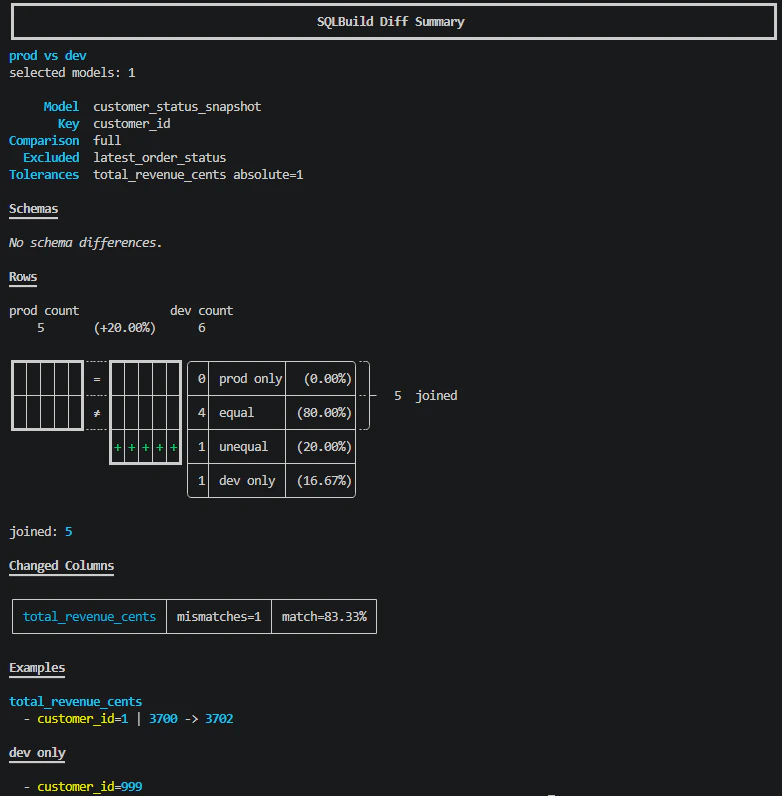
Comparison modes
Every diff requires exactly one mode:Full diff
Compares both schema and row-level data for the selected models:unique_key and compared column by column. The output shows:
- Row counts for each environment
- How many rows are equal, unequal, or only in one side
- Which columns have mismatches with match percentages
- Example values showing what changed
Schema-only diff
Compares column names and types without looking at row data:Bounded diff
Compares only a recent window of data using the model’s cursor:14d, 6h, 30m). For integer cursors, the bound is an integer value. If the model has no cursor configured, the diff falls back to a full row comparison.
Row matching
Rows are matched between environments using the model’sunique_key. For models without a unique_key, SQLBuild uses all columns as a composite key.
The diff output categorises rows as:
- Equal - same key, same values in both environments
- Unequal - same key, different values (with per-column breakdown)
- Left only - exists in the
--fromenvironment but not--to - Right only - exists in the
--toenvironment but not--from
Tolerances
Numeric columns can have tolerance rules to avoid false positives from floating-point differences or acceptable variance. Configure tolerances in the model’sMODEL() header:
absolute- maximum allowed absolute difference (e.g.1means values differing by 1 or less are treated as equal)relative- maximum allowed relative difference as a decimal (e.g.0.01for 1%)
by_column) or per-type (by_type).
Excluded columns
Columns that are expected to differ between environments (like timestamps or environment-specific values) can be excluded from the row comparison:row_diff_exclude_columns and unique_key.
Verbose output
Add--verbose or -v to see more example rows for mismatches and side-only rows:
Selectors
Diff requires--select in the current version. You can use any selector syntax:
Exit codes
sqb diff returns exit code 0 when all selected models have no differences, and 1 when any model has schema or row differences. This makes it usable in CI pipelines as a validation gate.