

Test properly
Most data testing checks for nulls and uniqueness. That tells you a column isn’t empty, not that your logic is right. SQLBuild tests the logic.- Multi-model tests. Mock your sources, assert on the model you care about, and SQLBuild resolves every intermediate model from its real SQL. One test file can cover a whole stretch of your pipeline.
- E2E scenario tests with local replay. Build the real model graph against coherent fixtures in isolated relations, capture the result as JSONL, and replay it locally through DuckDB. CI runs full end-to-end tests with zero warehouse credentials or compute.
- Macro-powered mocks. Tests are SQL, so they support macro calls - write reusable mock generators instead of copy-pasting fixtures.
Verify early
Before any model runs, SQLBuild does static analysis of your project - offline, no warehouse connection needed.- Catch errors at compile. SQL syntax, type inference, contract checks, and column lineage all run before execution. A bad reference or a type mismatch fails at compile, with an error that points at the line - not halfway through a warehouse run.
- Turn review decisions into compiler checks. Configure Rules over compiler-owned SQL, models, dependencies, contracts, tests, and project paths.
- Format separately.
sqb formatowns deterministic source rewriting; Rules remain diagnostic-only. - Fast, because it’s Rust where it counts. Static analysis runs on Polyglot, a Rust SQL engine (MIT, 32+ dialects), so compile stays quick even on large projects.
- Open, not paywalled. The static analysis is part of the Apache-2.0 core - no proprietary engine, no separate login, and no paid tier gating the smart checks.
Plans that explain every build
Start simple. By default,sqb build runs your full selection - the same predictable mental model as dbt, with nothing to configure. For many projects, that is all they will ever need.
Every model, seed, function, and Python node has a versioned identity. SQLBuild uses those identities
to explain query and configuration changes, propagate upstream changes, choose incremental replay
actions, and protect scoped builds from stale dependencies. Direct mode still runs the selected
scope; change detection makes that plan explicit rather than silently changing what was selected.
Virtual environments add version reuse and optional stale-driven
execution when a project needs isolated previews, promotion, and rollback.
The planner carries that evidence across the whole graph:
- Models and functions: query, configuration, and dependency identities explain local and cascaded changes.
- Seeds: content and load-affecting configuration identify when a seed changed.
- Audits: audit evidence is associated with the model version it validated.
- Source freshness: observable source data versions can affect downstream plans, with lag tolerance to avoid jitter.
- Cascade propagation: when a model does change, the signal propagates downstream, with configurable replay windows (
replay_on_change). - Python nodes: source and dependency identities appear in plans; skip/run remains user-controlled through
ctx.skip().
Deploy reversibly (opt-in)
By default, SQLBuild runs in direct mode with state as append-only rows in your warehouse. When you want more, virtual environments add a reversibility layer on top:- Instant branching, promotion, and rollback as low-copy pointer operations.
- Partial promotion. Promote the models that are ready without re-running everything downstream of them - you don’t have to rebuild the whole closure to ship one fix.
- Checkpoints and reconciliation so a bad change is something you undo, not an incident.
Supported adapters
SQLBuild works with DuckDB, MotherDuck, Snowflake, BigQuery, Databricks, PostgreSQL, and SQL Server today. Support for ClickHouse, Redshift, Trino, Spark, and Athena is on the way. DuckDB runs entirely locally, so you can try SQLBuild and run full E2E tests without any warehouse credentials. Head to the Quickstart to get a project running in minutes, or see Adapters for connection setup.More in SQLBuild
Familiar SQL models
Models are SQL files with aMODEL() header and a SELECT. References to other models and sources use __ref() and __source(), and configuration, schema, and audits are declared inline in the header. If you know dbt or SQLMesh, you already know the shape.
Python macros, not Jinja
- Real Python functions: Macros are plain Python, called with
@macro()in SQL. Testable, debuggable, and composable with standard tooling - no Jinja, no string-templating language to wrangle.
Audits that block bad data
- Full table builds: SQLBuild materializes into a staging table and runs
error-severity audits before promotion. If any fail, the swap is blocked and the production table is untouched. - Incremental models: Delta-phase audits validate each batch before DML is applied. Bad data is caught before it reaches the target.
- Measured quality: Measurement audits evaluate values against warning/error thresholds, distinguish insufficient samples, and can retain bounded evidence and immutable result history.
Incremental processing
- Cursor-based replay: SQLBuild resumes by reading the highest timestamp or integer value already in the target table. If a model fails for several runs, the next successful build picks up from the last data it actually wrote, with no manual backfilling.
- Microbatch mode: Split large replay windows into configurable batches, each with its own audit cycle. Or process the full range in one pass, the choice is per-model.
- Replay on change: When a model’s version identity changes,
replay_on_changecontrols how much data to reprocess:forward(default, just run the next delta),bounded-14d(replay a window), orfull(rebuild the table).
Python you can read and extend
- The framework is Python. Adapters, macros, hooks, providers, custom materializations, and Python nodes are all plain Python you can read and extend. (The SQL analysis underneath runs on Rust via Polyglot - see Verify early - so the code you work with stays Python while compile stays fast.)
Testing in depth
Beyond the multi-model tests shown above, SQLBuild runs end-to-end scenario tests against the real model graph, with local replay and property assertions.- Real graph execution: Define coherent fixture inputs, and SQLBuild builds the real model graph against them in isolated warehouse relations. Test end-to-end business logic across your entire pipeline, not just one model at a time.
- Local replay without a warehouse: Capture scenario fixtures as JSONL snapshots, then replay them locally through DuckDB. CI pipelines run full E2E tests with zero warehouse credentials or compute cost.
- Zero-row assertions: Write property checks that pass when no rows violate a condition. Useful for invariants like “no negative revenue” or “no duplicate customer IDs” alongside full expected-output comparisons.
Python nodes
Grow beyond warehouse-only SQL without leaving the graph. Python nodes are ordinary functions, decorated to become first-class nodes in the same DAG as your SQL models, and they run as part ofsqb build. There are four kinds:
- Loaders (
@loader) load external data into managed sources, with incremental write strategies (table, append, delete_insert, merge), cursor-based loading, and concurrent execution. - Tasks (
@task) run Python computation or side effects as graph nodes. - Assets (
@asset) produce or observe external artifacts, with optional columns and lineage. - Checks (
@check) validate tasks, assets, and loaders, and run duringsqb buildor on their own withsqb check.
@factory. See Python Nodes.
Multi-target workflows
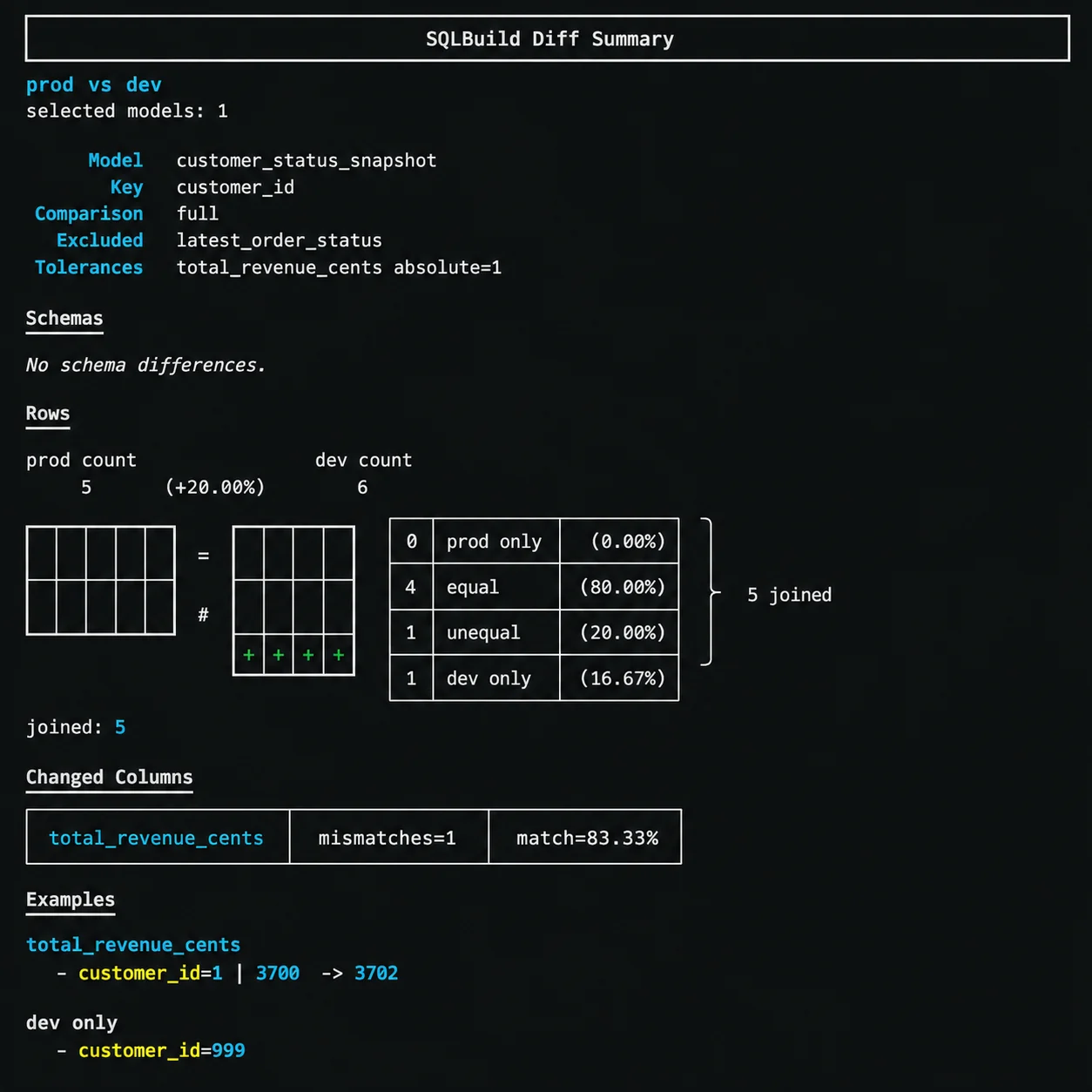
- Data diffs: Compare schemas and row-level data between targets (or virtual environments) with
sqb diff prod:dev.
- Zero-copy cloning: Branch targets instantly with
sqb clonewithout duplicating data. - Deferred references: Resolve a production namespace with
--defer-tothrough the active target’s connection while building in dev. - No manifest required: Clone, diff, and defer work directly against live targets. No
manifest.jsongeneration, no artifact management, no stale state.
Extensibility
- User-defined functions: SQL and Python UDFs managed as part of your project. Functions participate in the DAG - definition changes trigger rebuilds of dependent models. Table functions provide predicate-pushdown-friendly alternatives to final-layer views.
- Custom materializations: Write materialization logic in Python with full framework integration - including audit hooks, schema change signals, and query change detection.
- Path-between selectors:
--select fact_orders~daily_activity_rollupselects every model on the shortest path between two nodes, with optional upstream/downstream expansion.
What’s next
- Broader adapter support - ClickHouse, Redshift, Trino, Spark, Athena
Quick links
Quickstart
Get a project running locally in minutes.
CLI Reference
Reference for SQLBuild commands and flags.
Concepts
Understand models, incremental strategies, audits, and selectors.
Scenarios
E2E tests with local DuckDB replay.