> ## Documentation Index
> Fetch the complete documentation index at: https://docs.sqlbuild.com/llms.txt
> Use this file to discover all available pages before exploring further.
# Data Diffs
> Compare schemas and data between targets or virtual environments to validate changes before promotion.
SQLBuild can compare schemas and row-level data between two build contexts. This lets you validate that changes produce the expected results before promoting them.
`sqb diff FROM:TO` compares:
* **two targets** (e.g. `prod:dev`) in standard mode, or
* **two virtual environments** (VDEs) when [virtual environments](/concepts/virtual-environments) are enabled.
The mechanics below are identical for both; only what `FROM` and `TO` refer to changes.
```bash theme={null}
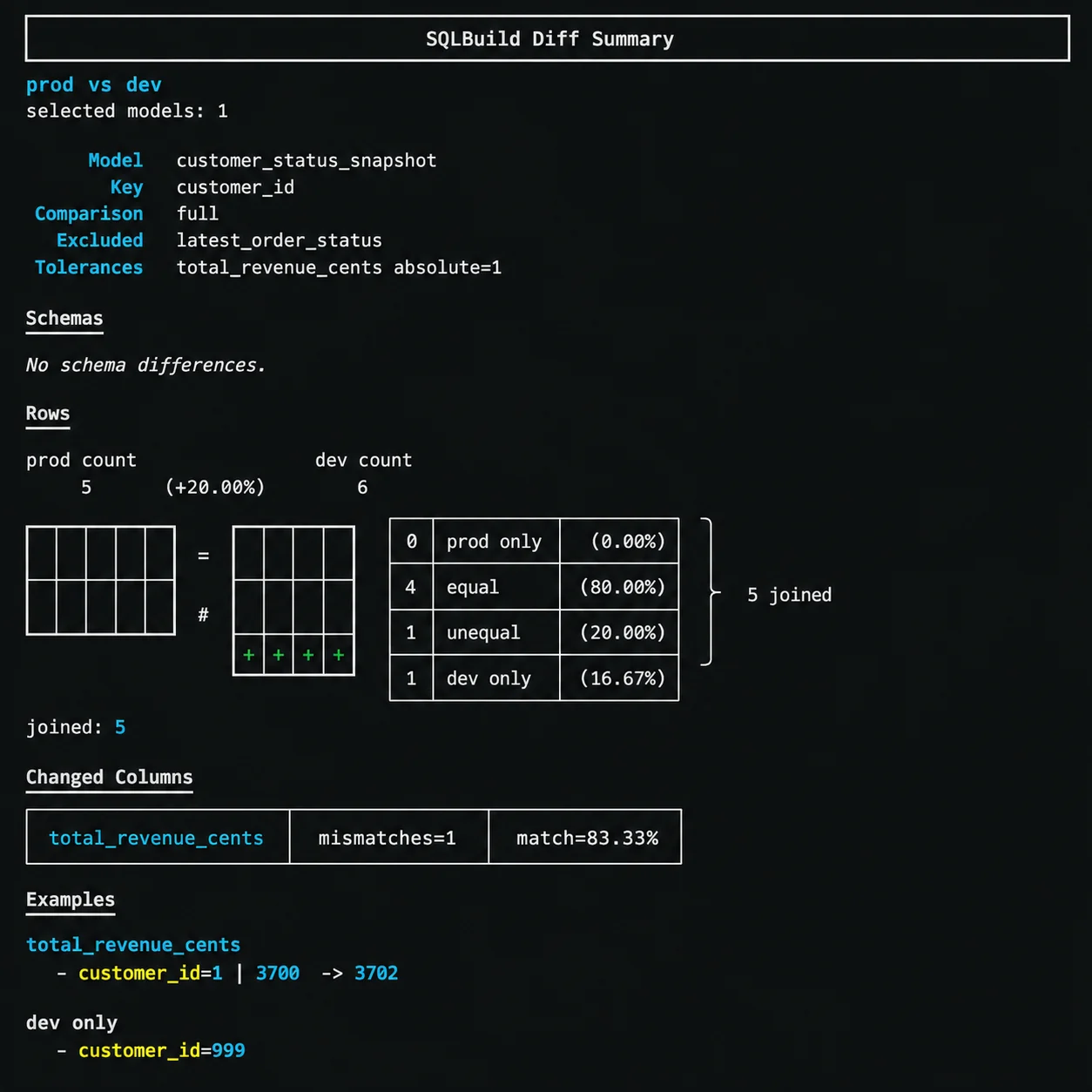
sqb diff prod:dev --full --select customer_status_snapshot
```
 ## Comparison modes
Every diff requires exactly one mode:
### Full diff
Compares both schema and row-level data for the selected models:
```bash theme={null}
sqb diff prod:dev --full --select fact_orders
```
Rows are joined on the model's `unique_key` and compared column by column. The output shows:
* Row counts for each side
* How many rows are equal, unequal, or only in one side
* Which columns have mismatches with match percentages
* Example values showing what changed
### Schema-only diff
Compares column names and types without looking at row data:
```bash theme={null}
sqb diff prod:dev --schema-only --select fact_orders
```
Useful for quick structural checks or when row comparison would be too expensive.
### Bounded diff
Compares only a recent window of data using the model's cursor:
```bash theme={null}
sqb diff prod:dev --bounded 14d --select hourly_order_activity
```
For timestamp cursors, the bound is a duration (`14d`, `6h`, `30m`). For integer cursors, the bound is an integer value. If the model has no cursor configured, the diff falls back to a full row comparison.
## Row matching
Rows are matched between the two sides using the model's `unique_key`. Models without a `unique_key` can use schema-only diff but cannot run full or bounded row comparisons.
The diff output categorises rows as:
* **Equal** - same key, same values on both sides
* **Unequal** - same key, different values (with per-column breakdown)
* **Left only** - exists in the FROM side but not TO
* **Right only** - exists in the TO side but not FROM
## Tolerances
Numeric columns can have tolerance rules to avoid false positives from floating-point differences or acceptable variance. Configure tolerances in the model's `MODEL()` header:
```sql theme={null}
MODEL (
materialized incremental,
...
row_diff_tolerances (
by_column (
total_revenue_cents (
absolute 1,
),
),
),
);
```
Tolerance rules support:
* **`absolute`** - maximum allowed absolute difference (e.g. `1` means values differing by 1 or less are treated as equal)
* **`relative`** - maximum allowed relative difference as a decimal (e.g. `0.01` for 1%)
Tolerances can be set per-column (`by_column`) or per-type (`by_type`).
## Excluded columns
Columns that are expected to differ between the two sides (like timestamps or context-specific values) can be excluded from the row comparison:
```sql theme={null}
MODEL (
materialized incremental,
...
row_diff_exclude_columns [latest_order_status],
);
```
Excluded columns are still shown in the schema comparison but skipped during row-level diffing. A column cannot be in both `row_diff_exclude_columns` and `unique_key`.
## Verbose output
Add `--verbose` or `-v` to see more example rows for mismatches and side-only rows:
```bash theme={null}
sqb diff prod:dev --full --select customer_status_snapshot --verbose
```
Default sample limits are 3 per category. Verbose mode increases this to 10. You can also set exact limits:
```bash theme={null}
sqb diff prod:dev --full --select customer_status_snapshot --max-column-examples 20 --max-row-only-examples 5
```
## Selectors
Diff requires `--select` in the current version. You can use any selector syntax:
```bash theme={null}
# Diff a single model
sqb diff prod:dev --full --select customer_status_snapshot
# Diff all models in a path
sqb diff prod:dev --schema-only --select path:models/marts
# Diff models with a specific tag
sqb diff prod:dev --full --select tag:acceptance
```
## Exit codes
`sqb diff` returns exit code `0` when all selected models have no differences, and `1` when any model has schema or row differences. This makes it usable in CI pipelines as a validation gate.
## Comparison modes
Every diff requires exactly one mode:
### Full diff
Compares both schema and row-level data for the selected models:
```bash theme={null}
sqb diff prod:dev --full --select fact_orders
```
Rows are joined on the model's `unique_key` and compared column by column. The output shows:
* Row counts for each side
* How many rows are equal, unequal, or only in one side
* Which columns have mismatches with match percentages
* Example values showing what changed
### Schema-only diff
Compares column names and types without looking at row data:
```bash theme={null}
sqb diff prod:dev --schema-only --select fact_orders
```
Useful for quick structural checks or when row comparison would be too expensive.
### Bounded diff
Compares only a recent window of data using the model's cursor:
```bash theme={null}
sqb diff prod:dev --bounded 14d --select hourly_order_activity
```
For timestamp cursors, the bound is a duration (`14d`, `6h`, `30m`). For integer cursors, the bound is an integer value. If the model has no cursor configured, the diff falls back to a full row comparison.
## Row matching
Rows are matched between the two sides using the model's `unique_key`. Models without a `unique_key` can use schema-only diff but cannot run full or bounded row comparisons.
The diff output categorises rows as:
* **Equal** - same key, same values on both sides
* **Unequal** - same key, different values (with per-column breakdown)
* **Left only** - exists in the FROM side but not TO
* **Right only** - exists in the TO side but not FROM
## Tolerances
Numeric columns can have tolerance rules to avoid false positives from floating-point differences or acceptable variance. Configure tolerances in the model's `MODEL()` header:
```sql theme={null}
MODEL (
materialized incremental,
...
row_diff_tolerances (
by_column (
total_revenue_cents (
absolute 1,
),
),
),
);
```
Tolerance rules support:
* **`absolute`** - maximum allowed absolute difference (e.g. `1` means values differing by 1 or less are treated as equal)
* **`relative`** - maximum allowed relative difference as a decimal (e.g. `0.01` for 1%)
Tolerances can be set per-column (`by_column`) or per-type (`by_type`).
## Excluded columns
Columns that are expected to differ between the two sides (like timestamps or context-specific values) can be excluded from the row comparison:
```sql theme={null}
MODEL (
materialized incremental,
...
row_diff_exclude_columns [latest_order_status],
);
```
Excluded columns are still shown in the schema comparison but skipped during row-level diffing. A column cannot be in both `row_diff_exclude_columns` and `unique_key`.
## Verbose output
Add `--verbose` or `-v` to see more example rows for mismatches and side-only rows:
```bash theme={null}
sqb diff prod:dev --full --select customer_status_snapshot --verbose
```
Default sample limits are 3 per category. Verbose mode increases this to 10. You can also set exact limits:
```bash theme={null}
sqb diff prod:dev --full --select customer_status_snapshot --max-column-examples 20 --max-row-only-examples 5
```
## Selectors
Diff requires `--select` in the current version. You can use any selector syntax:
```bash theme={null}
# Diff a single model
sqb diff prod:dev --full --select customer_status_snapshot
# Diff all models in a path
sqb diff prod:dev --schema-only --select path:models/marts
# Diff models with a specific tag
sqb diff prod:dev --full --select tag:acceptance
```
## Exit codes
`sqb diff` returns exit code `0` when all selected models have no differences, and `1` when any model has schema or row differences. This makes it usable in CI pipelines as a validation gate.